About Us Contact Us
Login to
Directors Guild of America – Producer Pension and Health Plans
  • Home
  • Health Plan
        • Benefits Overview
          • Medical - Network
          • Medical - Non-Network
          • Prescription Drugs
          • Dental
          • Vision
          • Infertility
          • Paid Parental Leave
          • Preventive Care
          • UCLA/EIMG Health Clinics
        • Request a Predetermination to Estimate Coverage
        • Summary of Coverage Plans
        • Qualifying for Coverage
          • Open Enrollment
          • Adding Dependents
        • Filing a Claim
        • Transparency in Coverage – Machine-Readable Files
        • Find A Network Provider
        • Coverage Extensions
          • Self-Pay Plans
        • Pay Your Premium
          • By Phone
          • Online
          • By Check
          • By Automatic Pension Deduction
        • Medicare
        • Affordable Care Act Information for Participants
        • Health Services and Assistance for Non-Covered Participants
        • Health Plan Summary Plan Description
  • Pension Plans
        • Benefits Overview
          • Basic Pension Plan
          • Supplemental Pension Plan
        • Rollovers into the Supplemental Plan
        • Pension Plans’ Investment Program
          • Investment Performance
          • Asset Allocations
        • Pension Plans Summary Plan Description
  • News
  • Documents and Forms
    • Spotlight on Benefits Newsletters
    • Demographics Documents
    • Health Plan Documents
    • Pension Plans Documents
    • Health Plan Summary Plan Description
    • Pension Plans Summary Plan Description
  • Online Services
    • Anthem Blue Cross
      Benefits Portal
    • CVS Caremark Online
    • Delta Dental Online
    • E-Bill Express
      Online Payments
    • Vision Service Plan Online
    • Benefits Portal
  • Producers
    • Contributions Forms
    • Signatory Employer Guide

Producer Online Contributions Reporting Instructions

To submit contributions electronically, the contributions data must conform to the Plans’ File Specifications found here. Please contact the Plans’ office at (323) 866-2200, ext. 567 to submit a test file and to receive a unique ID and password to log onto the Plans’ electronic submission portal.

To connect to the upload page, go to https://www.dgaplans.org/Producer-Login in Internet Explorer.

Note: It is recommended that you have Internet Explorer 11 with the latest security patches to ensure the highest level of security for your data.

The following topics are covered on this page. Click a link below to jump to that section. A PDF version of these instructions is available here.

Logging In

Changing Your Password

Uploading Your File

To skip directly to examples and detailed specifications for supported file types, click here.

Logging In

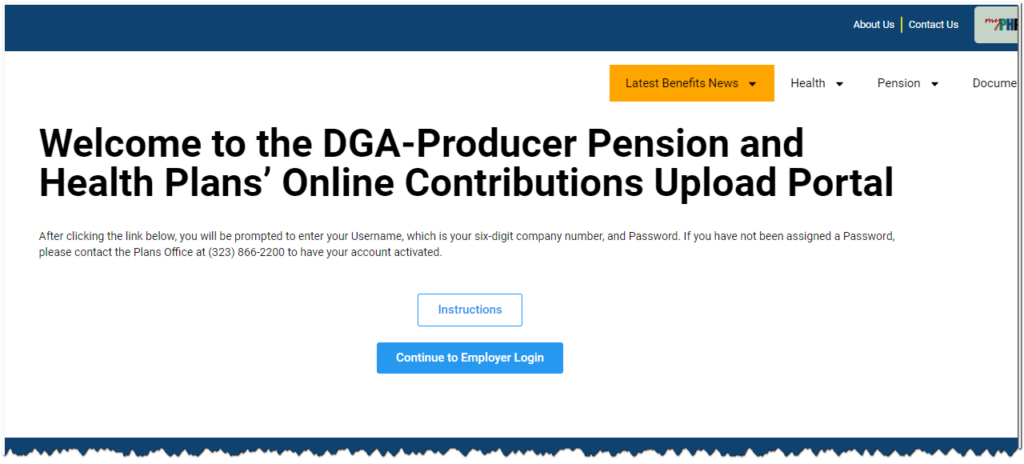
  1. After opening Producer Login page in Internet Explorer, you will see the following welcome screen. Click Continue with Producer Login to go to the login page.
    Welcome Screen
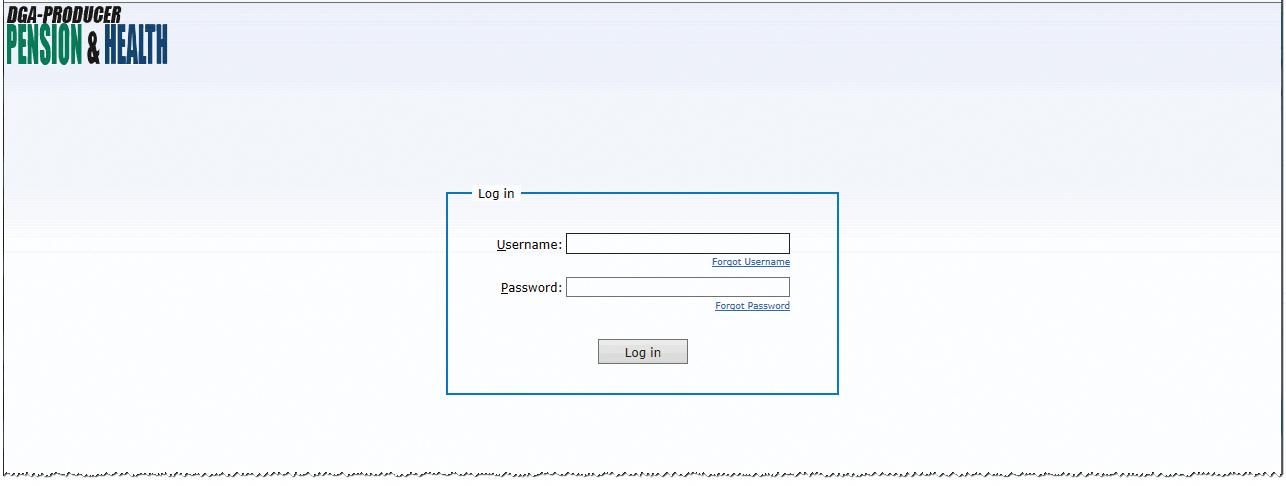
  2. On the login page, enter your assigned username and password and click Log in.
  1. Once your credentials are validated, the secure gateway/tunnel is activated, and you will be automatically redirected to the Web Transfer Client page.

Changing Your Password

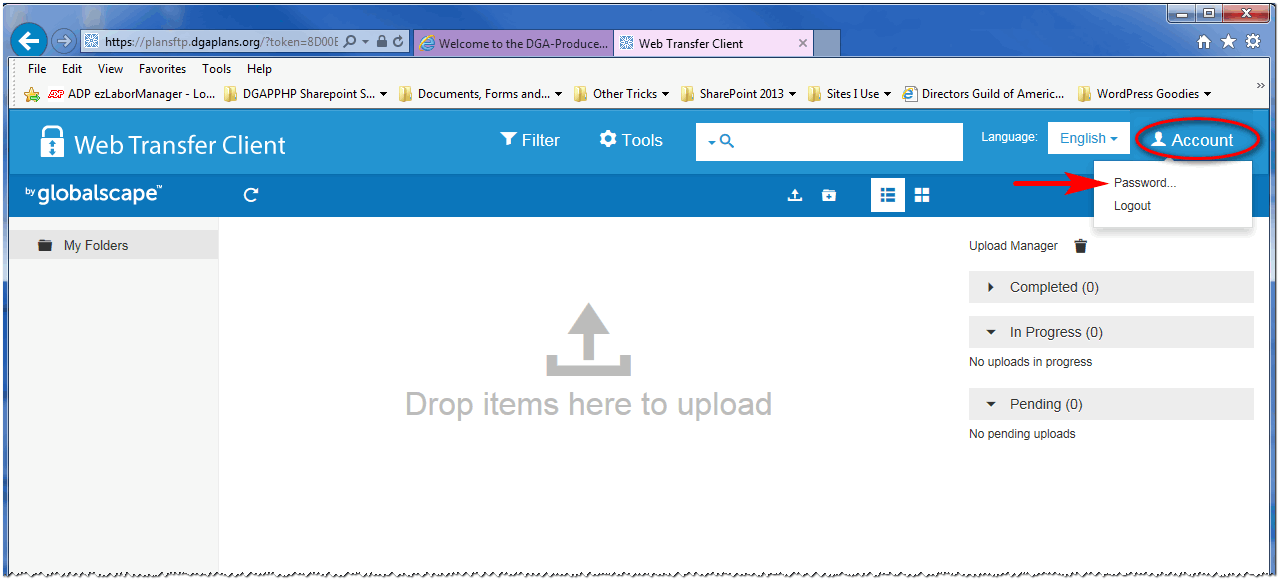
After your first login, and periodically thereafter, you should change your password. The Web Transfer Client page provides this functionality.

  1. On the Web Transfer Client page, click the Account button in the upper right corner of the window, then choose Password… from the menu.
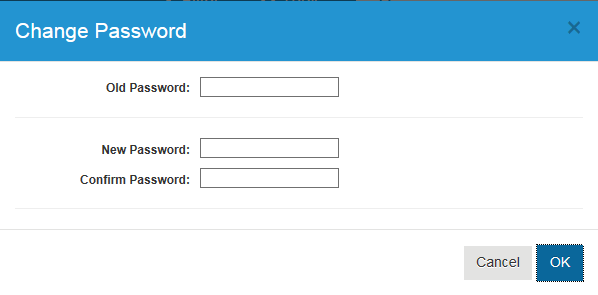
    The following form will pop up.

  1. Enter your Current (Old) Password, then enter and confirm your New Password in the spaces provided.
  2. Click OK to apply the change. You will use this password the next time you log in.

Uploading Your File

NOTE: You should upload ONE FILE AT A TIME. Although the system supports simultaneous uploading of multiple files and file folders, proper processing requires that you upload only ONE FILE at a time and then wait for each upload to complete before uploading the next file.

To upload your file, follow the steps below.

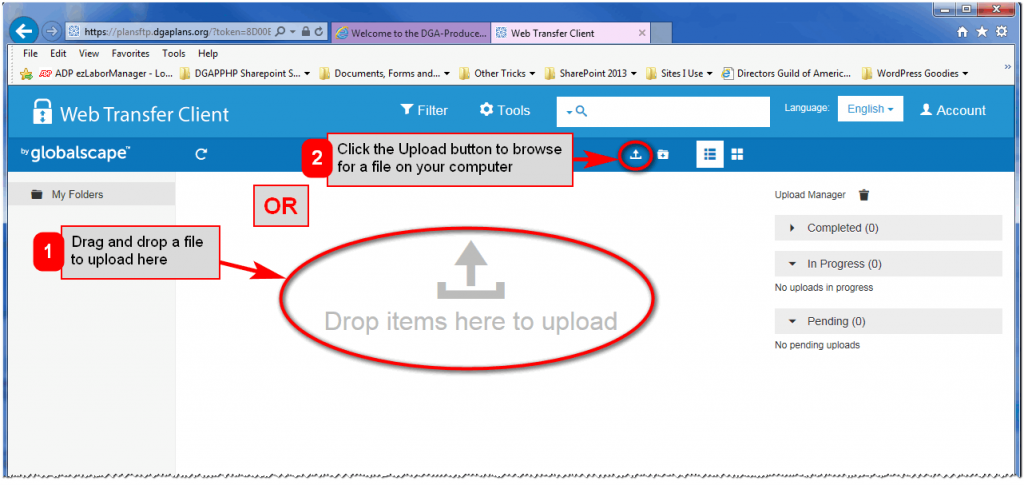
  1. Once you have logged in, you have two ways to upload your file: (1) drag and drop your file into the designated area of the Web Transfer Client window or (2) click the Upload button () to browse to a file on your computer.
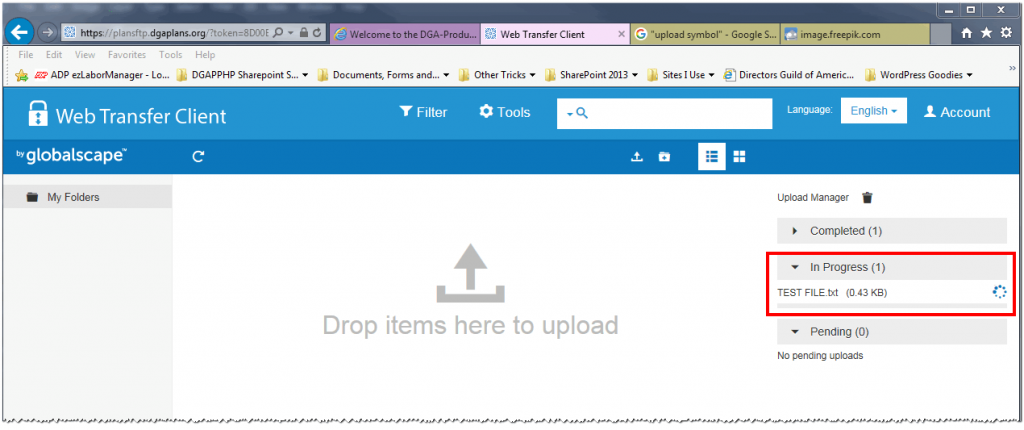
  2. When you have either dropped your file into the designated area or chosen a file from your computer via the Upload button, the progress of your uploading file will appear under the In Progress dropdown at the far right of the window.
    Files may be uploaded in comma-delimited, tab-delimited and fixed-width formats. Each file type has particular specifications. Click the links below for specifications and examples of each type:
    • Comma-delimited file (.csv)  through June 30, 2024     beginning July 1, 2024
    • Tab-delimited text file (.txt)  through June 30, 2024     beginning July 1, 2024
    • Fixed-width text file (.txt)   through June 30, 2024     beginning July 1, 2024
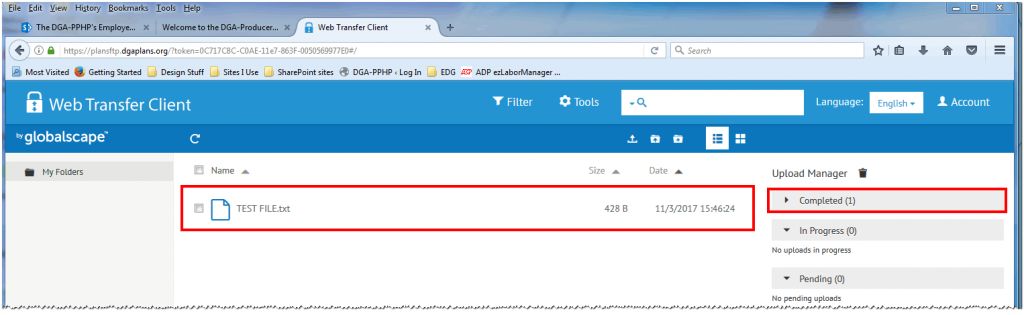
  3. When the file has completed uploading, it will be listed in the drag and drop area. It will also disappear from the In Progress group and appear under the Completed group. You may then upload the next file if you have one.
    After each successfully uploaded file, you or your company’s designated contact will receive an email from the DGA Plans confirming that the file was received and is being processed.
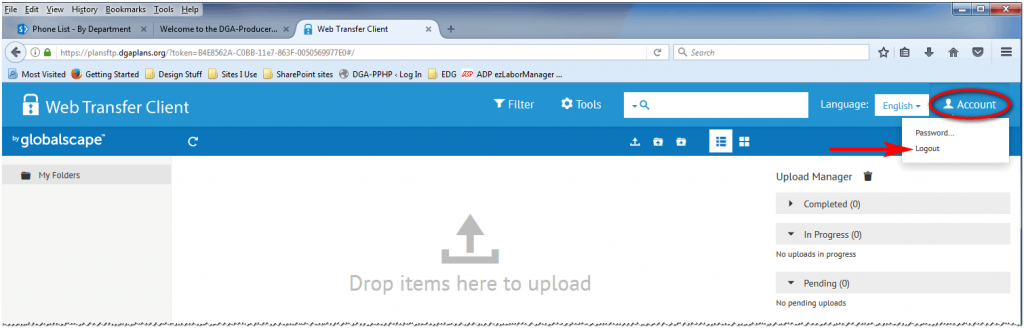
  4. To log out after you have completed your upload(s), either (1) close your Internet Explorer browser window or (2) click the Account button in the upper right corner and choose Logout from the menu.

Although, your connection to the secure tunnel will timeout after a few minutes of inactivity, it is always a good idea to closeout your session to keep your data secure.

More for Producers…

Employer Information

Contributions Forms

Online Contributions Reporting

Online Reporting Instructions

File Specifications

Online Contributions Upload Portal

About Us

Created as a result of the Directors Guild of America's collective bargaining agreements with producer associations representing the motion picture, television and commercial production industries, the DGA-Producer Pension and Health Plans provide excellent benefits to participants.

The DGA-Producer Pension and Health Plans are separate entities from the DGA and are administered by a Board of Trustees made up of DGA representatives and Producers' representatives.

Contact Us

Main Phone: (877) 866-2200

🏢 OFFICE LOCATION & HOURS:

5055 Wilshire Boulevard
Suite 600
Los Angeles, CA 90036

Monday through Friday
8:30 a.m. to 5:00 p.m. Pacific Time

🤝 MEETING INFORMATION:

To schedule an in-person meeting: click here
To schedule a virtual meeting: click here

📠 FAXES:

Contributions: (323) 866-2311
Demographics: (323) 866-2389
Health Plan Claims: (323) 782-9287
Health Plan Eligibility: (323) 866-2399
Pension: (323) 866-2372

For department directory and more contact options, click here.

HIPAA Notice of Privacy Practices           Surprise Billing Notice           Online Security Tips

Copyright 2025 Directors Guild of America–Producer Pension and Health Plans | All Rights Reserved

This website uses cookies and similar technologies to enhance your experience. By continuing to use this website you are giving consent to cookies being used. For more information, please read our Privacy Policy. Got it.
Privacy & Cookies Policy

Privacy Overview

This website uses cookies to improve your experience while you navigate through the website. Out of these cookies, the cookies that are categorized as necessary are stored on your browser as they are essential for the working of basic functionalities of the website. We also use third-party cookies that help us analyze and understand how you use this website. These cookies will be stored in your browser only with your consent. You also have the option to opt-out of these cookies. But opting out of some of these cookies may have an effect on your browsing experience.
Necessary
Always Enabled
Necessary cookies are absolutely essential for the website to function properly. This category only includes cookies that ensures basic functionalities and security features of the website. These cookies do not store any personal information.
Non-necessary
Any cookies that may not be particularly necessary for the website to function and is used specifically to collect user personal data via analytics, ads, other embedded contents are termed as non-necessary cookies. It is mandatory to procure user consent prior to running these cookies on your website.
SAVE & ACCEPT